Category: Ubuntu

  • Ubuntu 25.10 Handles Multiple WiFi and Ethernet Connections Really Well (seemingly…)

    In seeming opposite to the pain of trying to set up remote visual management, Ubuntu seems to handle dual WiFi and dual ethernet connections surprisingly well right out of the box. With a dual 2.5 gig N100 Mini PC, I have it set up so each pair has an input and share.

    Normally the PC does not have a connection but inserting a WiFi USB enables the WAN connection. The WiFi hotspot is always enabled, though hidden, so remote management and files are always available.

    For the wired connection, a similar setup with one 2.5 NIC as an input and the other shared to any systems that are connected. (Link aggregation not configured.)

    Definitely need to document a few scenarios but the out-of-the-box set up is very useful.

    Updated and Retried on 25.10 11/26/25

  • Ubuntu 25.10 SSH doesn’t enable easily

    While this seems like a bug, I’m not sure if it is or not. Installing a fresh 25.10 the SSH option in System doesn’t turn on SSH right out of the box. Might be worth adding to an ansible playbook or other initial set up script.

    Link to Jeff Geerling’s post below but it’s really down to just installing openssh-server. After that the option slider should work.

    sudo apt install openssh-server -y

    Setting up Ubuntu SSH Server.

    Updated and Retried on 25.10 11/20/25

  • Ubuntu 25.10 Remote Desktop with Fixed Password and Full Screen Window (VNC alternative)

    Stop: This doesn’t work. Unfortunately on further testing, the keyring doesn’t unlock without interacting via monitor/keyboard.


    This feels unnecessarily difficult. While ideally you interact most servers via CLI the reality is there will be some visual interaction needed for some systms and currently Ubuntu 25.10 does not seem to have easy headless management with x11 gone. Sure you might be able to rip out the keyring but that doesn’t feel good. Annoying. Will keep testing and following up.


    Starting from a reinstall of Ubuntu 25.10 on the N100 Mini PC, more on this interesting little PC later, the script that resets the password works a treat though I don’t have it running automatically.

    There are 2 options in 25.10 Remote Desktop and Remote Login. Now it seems like Remote Login should be what we need, it’s password does not change, but as of this post that login is not working for me whether I have it enabled with Remote Desktop or not. Will dig into that and see if there’s a bug report already.

    Remote Desktop Password Reset Script

    Again credit to LarkinZero for the password updating script. For now, running this on connect. This system will be mobile so having a secure password is a good idea. Just running this via SSH works well.

    #!/bin/bash
    
    SCHEMA="org.gnome.RemoteDesktop.RdpCredentials"
    LABEL="GNOME Remote Desktop RDP credentials"
    USERNAME="abc"
    PASSWORD="123456"
    EXPECTED_VALUE="{'username': <'$USERNAME'>, 'password': <'$PASSWORD'>}"
    
    echo "Step 1: Clearing old credentials..."
    secret-tool clear xdg:schema "$SCHEMA"
    
    echo "Step 2: Storing new credentials..."
    echo -n "$EXPECTED_VALUE" | secret-tool store --label="$LABEL" xdg:schema "$SCHEMA"
    
    echo "Step 3: Verifying stored credentials..."
    RESULT=$(secret-tool lookup xdg:schema "$SCHEMA")
    
    if [ "$RESULT" == "$EXPECTED_VALUE" ]; then
        echo "Success: Stored credentials match the expected value."
        exit 0
    else
        echo "Error: Stored credentials do not match the expected value."
        exit 1
    fi

    Full Screen

    At first, I over-complicated this thinking there needed to be virtual monitor or a dummy plug but really, one setting.

    gsettings set org.gnome.desktop.remote-desktop.rdp screen-share-mode extend

    Not sure why that’s not set out-of-the-box. Without that setting, the RDP connects, is blank, and disconnects. With that setting, all works as expected.

    Updated and Retried on 25.10 11/21/25
  • Hide the TimeMachine SMB to avoid more permissions issues

    Pointing out a key element in the SMB code posted before.

    [smb-name-for-timemachine]
      ...
      valid users = timemachinename00, timemachinename01
      ...

    For the valid users, be sure to:

    1. Create SMB users for each separate system.
    2. Don’t include wider SMB users. If you accidentally click into that share in Finder on OSX, you’ll end up messing up the permissions for any other SMB you have loaded.
    3. If you change users or shares you’ll probably have to delete the old timemachine file and start again. You might be able to fix permissions but probably not worth going down that path.

    So far the setup is working (along with so many other services from the same N150 powered Ubuntu) really well and well worth the 2-3 hours of setup and refining times.

    Updated and Retried with Ubuntu 25.04 and MacOS Tahoe 26.0.1: 11/19/25

  • Nevermind, Immich on a shared N150, 70k files in 1 week

    With 70k+ photos and movies coming into immich; getting all new thumbnails, and organization I thought it would be months before the limited Intel N150 would finish processing but it may just be weeks. In fact, the library was usable almost overnight. Around 20k iCloud files came in about 2-3 hours. It seems like the RAW photos and video are taking the most time, as would be expected.

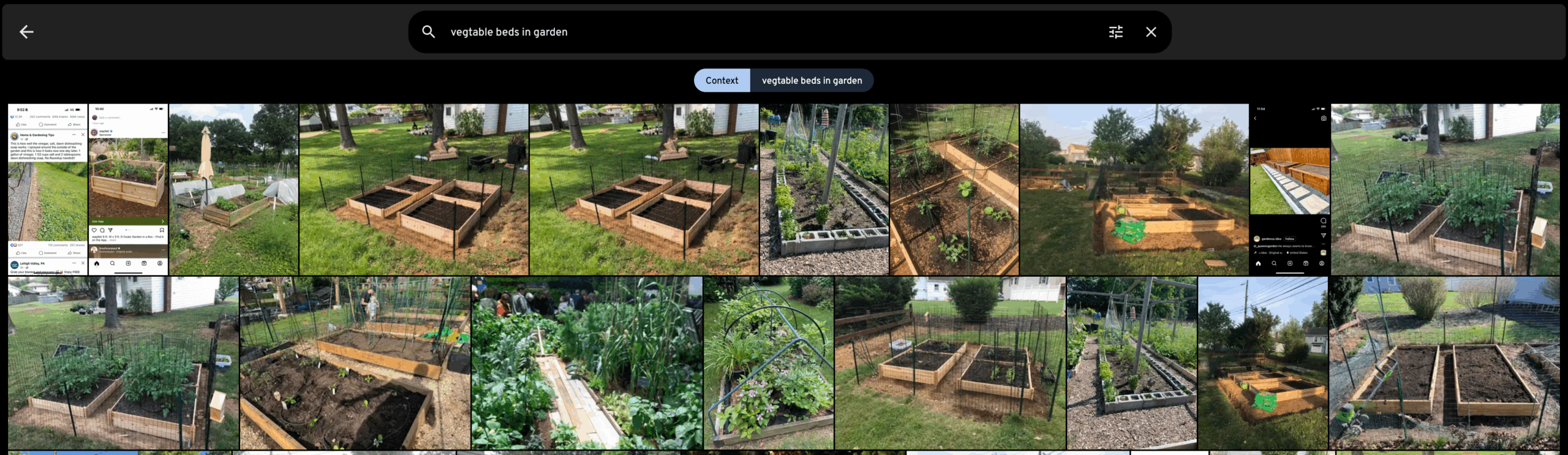
    What is more, the search already is producing great results.

    Need to revisit all the numbers but so far, impressive speed, and UX is great. Not doing everything standard though. We have iCloudPD pulling in images rather than using the phone backup but will go into more detail later.

    Updated and Retried on iOS and Ubuntu 25.04 powered by an N150 and 16 GB RAM 2025/11/10

  • Jellyfin for Music so far…

    While I bought a perpetual Plex license ages ago, I haven’t tried it for music yet. I opted to try Jellyfin first out of curiosity and see how easy it would be to get going in about 1 hour. From installing Jellyfin (on a non-LTS Ubuntu) to adding media, installing an iOS client, and playing music has come in just under that.

    Main issues so far:

    1. The official Jellyfin app doesn’t keep playing music on an iOS when closed.
    2. Tried Finamp briefly, worked, but no Carplay.
    3. Moved to Manet Music (which has a paid tier for Mac support) and so far working overall.

    Might try Plex music to see how it compares. Being able to call out tracks for a toddler on a roadtrip would be a north star to aim at for sure. So far, good.

    Updated and Retried on iOS and Ubuntu 25.04 2025/11/07